
UDDC Functions
Modified on Tue, 2 Dec, 2025 at 12:56 PM
Arithmetic functions
Abs (Absolute)
Function | Data Type | Description | Example |
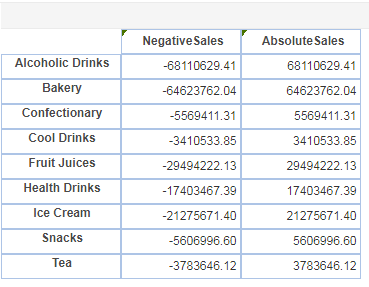
abs( number ) | Integer | Returns absolute value | abs(-68110629.41) returns 68110629.41, abs(-64623762.04) returns 64623762.04, abs(-5569411.31) returns 5569411.31 |
E.g.
- Ceil (Ceiling)
Function | Data Type | Description | Example |
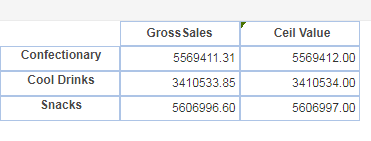
ceil( d ) | Integer | Returns the smallest integer value that is greater than or equal to a number | ceil(5569411.31) returns 5569412, ceil(3410533.85) returns 3410534, ceil(5606996.60) returns 5606997 |
E.g.
Exp (Exponential)
Function | Data Type | Description | Example |
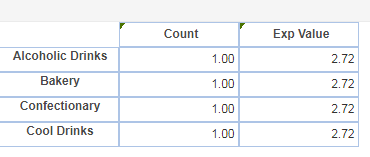
exp(d) | Integer | Returns e raised to the power of the specified number | exp(1) returns 2.72, exp(10) returns 22026.47 |
E.g.
Fact (Factorial)
Function | Data Type | Description | Example |
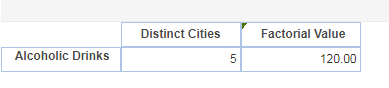
fact( i ) | Integer | Calculates Factorial value | fact( 5 ) returns 5*4*3*2*1 = 120 , fact (4) returns 4*3*2*1 = 24 |
Factorial definition: n* n- 1 n-2 ...... * 1 | |||
For example: 5! = 5*4*3*2*1 |
E.g.
Floor (Floor)
Function | Data Type | Description | Example |
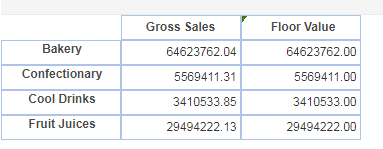
floor( d ) | Integer | Returns the largest whole number that is smaller than or equal to a specified number | floor(64623762.04 ) returns 64623762 floor(5569411.31 ) returns 5569411 |
E.g.
- Log (Logarithm)
Function | Data Type | Description | Example |
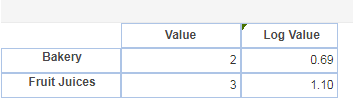
log( d ) | Integer | Returns the natural logarithm (base e) of the number | log(2) returns 0.69, log(3) returns 1.10 |
E.g.
LogTen (Log 10)
Function | Data Type | Description | Example |
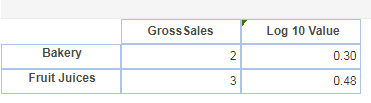
logTen( d ) | Integer | Returns the decimal logarithm (base 10) of a number | logTen(2 ) returns 0.3 , logTen(3) returns 0.48 |
E.g.
LogTen (Log 10)
Function | Data Type | Description | Example |
logTen( d ) | Integer | Returns the decimal logarithm (base 10) of a number | logTen(2 ) returns 0.3 , logTen(3) returns 0.48 |
E.g.
Max (Maximum)
Function | Data Type | Description | Example |
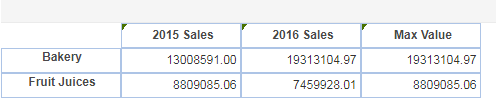
max( num1, num2) | Integer | Returns larger of the two numbers | max( 10, 15 ) returns 15, max(13008591.00,19313104.97) returns 19313104.97 |
E.g.
Min (Minimum)
Function | Data Type | Description | Example |
min( num1, num2) | Integer | Returns smaller of the two numbers | min( 10, 15 ) returns 10, min(13008591.00,19313104.97) returns 13008591.00 |
E.g.
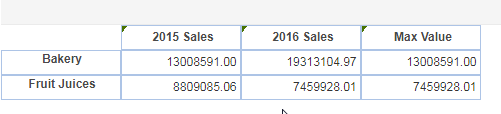
Mod (Modulus)
Function | Data Type | Description | Example |
mod(number, number ) | Integer | Returns modulus of two numbers (the remainder after dividing the first number with the other number) | mod(15,2) returns value 1, mod(20525794.54,19957914.39) returns 567880.15 |
E.g.
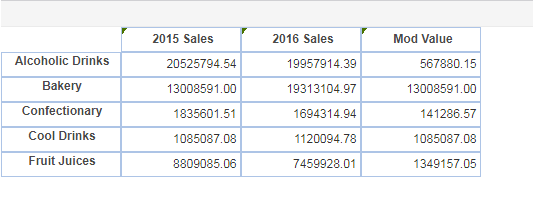
- Sign (Sign)
Function | Data Type | Description | Example |
sign(number) | Integer | Returns a number (-1,0 or 1 ) indicating sign of the number | sign(20525794.54) returns 1, sign(-20525794.54) returns -1 |
E.g.
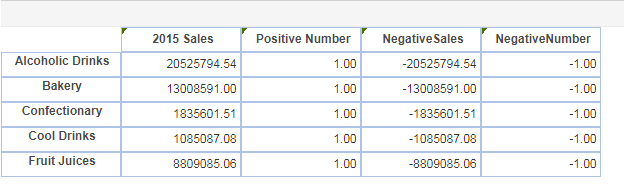
- SQRT (Square root)
Function | Data Type | Description | Example |
sqrt(number) | Integer | Returns a square root of a number | sqrt(100) returns 10, sqrt(-4) returns 2 |
E.g.
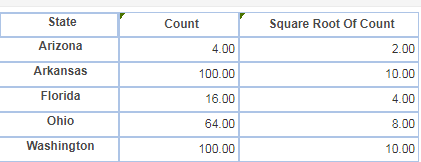
- Truncate (Truncate)
Function | Data Type | Description | Example |
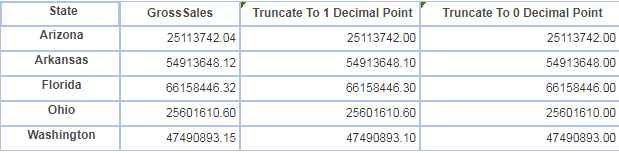
truncate( d, i ) | Integer | Returns a number truncated to a specified number of decimal places | truncate(54913648.12,1)returns 54913648.10 truncate ( 54913648.12, 0) returns 54913648 |
E.g.
- Random (Random)
Function | Data Type | Description | Example |
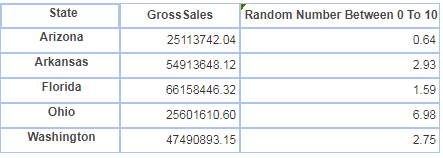
random(num1, num2 ) | Integer | Returns a number between two specified numbers | random( 0, 10) returns random numbers between the range |
E.g.
Date functions
Date
Function | Data Type | Description | Example |
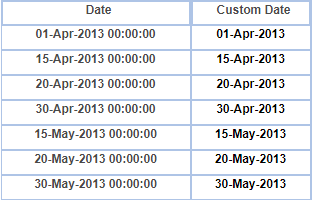
date( object ) | datetime | Extracts Date String from a DateTime value | Custom_Date : date(Date) date(01-Apr-2013 00:00:00) Returns : 01-Apr-2013 date(20-Apr-2013 00:00:00) Returns : 20-Apr-2013 |
E.g.
- DateAdd
Function | Data Type | Description | Examplee |
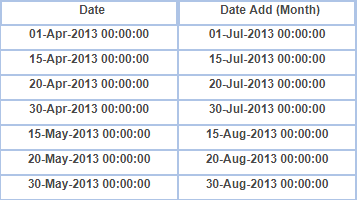
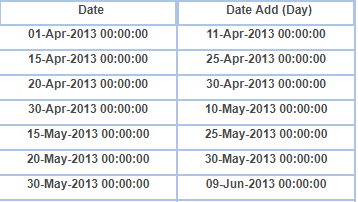
dateAdd("string", i,date) | datetime | Adds or subtracts a specified time interval from a date | dateAdd("m",3,Date) where “m” = month dateAdd(“01-Apr-2013 00:00:00 ”,3,date) Returns : 01-Jul-2013 00:00:00 dateAdd("d",10,Date)where “d” = day dateAdd(“01-Apr-2013 00:00:00 ”,-3,date) Returns : 11-Apr-2013 00:00:00 |
E.g.
E.g.
DateDiff
Function | Data Type | Description | Example |
dateDiff("string",date,date) | datetime | Returns the difference between two date values, based on the interval specified. | dateDiff("d",Custom_Date, Date) dateDiff(“01-apr-2013 00:00:00”,”08-Dec-2017 00:00:00”,Date) Returns : -1712 dateDiff("m",Custom_Date, Date) dateDiff(“30-may-2013 00:00:00”,”08-Dec-2017 00:00:00”,Date) Returns : 33 |
E.g.
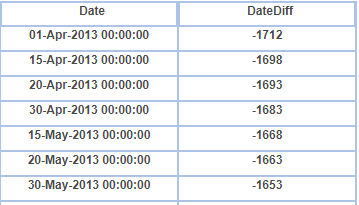
E.g.

- DatePart
Function | Data Type | Description | Example |
datePart("String",date) | datetime | Returns a single part of a date/time, such as year, month, day, hour, minute, etc. Returns a specified part of a given date, as an integer value | datePart("d",Date) datePart(“01-Apr-2013 00:00:00”,Date) Return : 1 datePart("m",Date) datePart(“30-May-2013 00:00:00”,Date)Return : |
E.g.
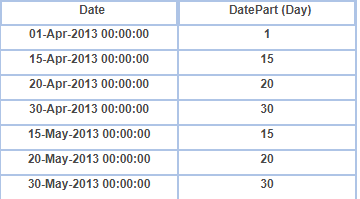
E.g.

- Day
Function | Data Type | Description | Example |
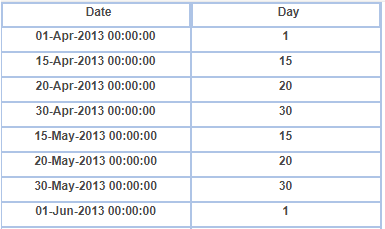
day( date) | datetime | Returns the day of a date, represented by a serial number which is an integer between 1 and 31 | day( Date) day(01-Apr-2013 00:00:00) Return : 1, day(30-May-2013 00:00:00) Return : 30 |
E.g.
- DayName
Function | Data Type | Description | Exampl |
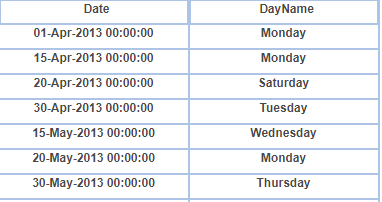
dayName( date ) | datetime | Returns the name of the day of the week | dayName( Date), dayName(01-Apr-2013 00:00:00) Return : Monday, dayName(30-May-2013 00:00:00) Return : Thursday |
E.g.
- DayNumber
Function | Data Type | Description | Example |
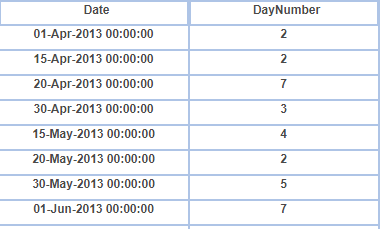
dayNumber(date) | datetime | Returns a number representing the day of the week. For example, Sunday is 1 and Wednesday is 4 | dayNumber(Date) dayNumber(01-Apr-2013 00:00:00) Return : 2, dayNumber(30-May-2013 00:00:00) Return : 5 |
E.g.
- DayAfter
Function | Data Type | Description | Example |
dayAfter(date,date) | datetime | Returns the number of days between two dates | dayAfter(Custom_Date, Date) dayAfter (01-Apr-2013 00:00:00,08-Dec-2017 00:00:00) Return : 1712 dayAfter (30-May-2013 00:00:00,08-Dec-2017 00:00:00) Return : 1653 |
E.g.

- FormatDate
Function | Data Type | Description | Example |
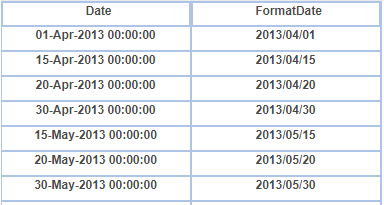
formatDate(date,"string") | datetime | Formats date as required | formatDate(Date,"yyyyMMdd") formatDate(01-Apr-2013 00:00:00,”YYYY/MM/dd”) Return : 2013/04/01 formatDate(30-May-2013 00:00:00,”YYYY/MM/dd”) Return : 2013/05/30 |
E.g.
- Hour
Function | Data Type | Description | Example |
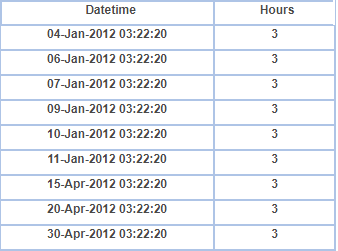
hour(date) | datetime | Returns the hour of a time value in the form of an integer ranging between 0 (12:00 A.M.) and 23 (11:00 P.M.) | hour(dateTime( "04-Jan-2012 03:22:20")) will return “3” hour(01-Apr-2012 03:22:20) Return : 3, hour(15-Apr-2012 03:22:20) Return : 3 |
E.g.
- Minute
Function | Data type | Description | Example |
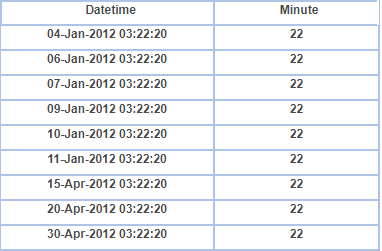
minute(date) | datetime | Returns the minutes of a time value in the form of an integer ranging between 0 and 59 | minute(dateTime( "04-Jan-2012 03:22:20")) will return “22” Minute(now)) returns the minutes of the current time. |
E.g.
Month
Function | Data Type | Description | Example |
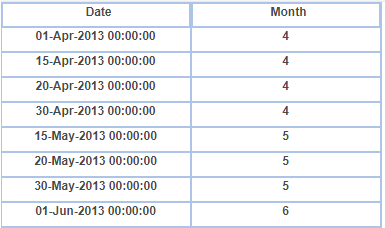
month(date) | datetime | Returns the month of a date in the form of an integer between 1 and 12 | month(Date) Month(01-Apr-2013 00:00:00) Return : 4, Month(30-May-2013 00:00:00) Return : 5 |
E.g.
- Now
Function | Description | Example |
now( ) | Returns the current time | Returns “20:38:40” |
RelativeDate
Function | Data Type | Description | Example |
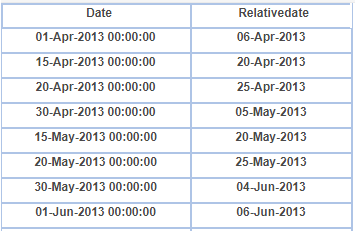
RelativeDate( date, i ) | datetime | Returns the date that comes n number of days after a given date | RelativeDate(Date, 5 ) RelativeDate(01-Apr-2013 00:00:00,5) Return : 06-Apr-2013, RelativeDate(30-May-2013 00:00:00,5) Return : 04-Jun-2013 |
Today
Function | Description | Example |
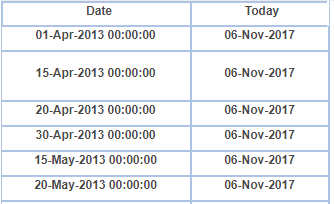
today( ) | Returns the current datetime value of the operating system as a DATE type | today() |
E.g.
E.g.
- Year
Function | Data Type | Description | Example |
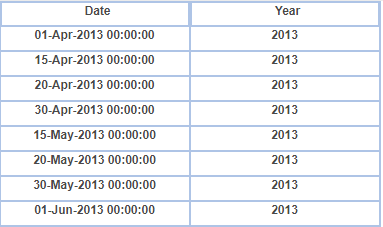
year( date ) | datetime | Returns the year corresponding to a date in the form of an integer between 1000 and 3000 | year( Date ), year(01-Apr-2013 00:00:00) Return : 2013, year(30-May-2013 00:00:00) Return : 2013 |
E.g.
- MonthName
Function | Data Type | Description | Example |
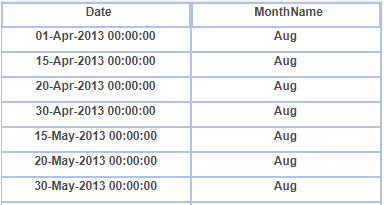
monthName(i,[d],[I]) | datetime | Returns the name of the month for a given month number | monthName(5, true, 4) Return : Aug, monthName(7,false, 4) Return : October |
E.g.
- RelativeTime
Function | Data Type | Description | Example |
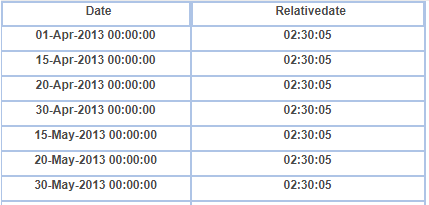
relativeTime( time, i ) | datetime | Returns the time that occurs n seconds after the given time | relativeTime(now( ), 100 ), relativeTime( time( "02:30:00 )”, 5 ) Return : 02:30:05 |
E.g.
- Second
Function | Data Type | Description | Example |
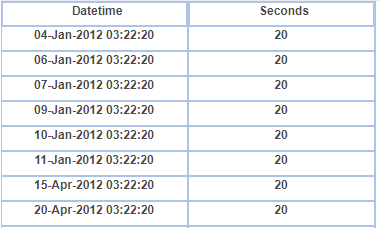
second( time ) | datetime | Returns the seconds of a time value in the form of an integer between 0 and 59) | second( now( ) ), second( time(03:22:20)), Return : 20 |
E.g.
Time
Function | Data Type | Description | Example |
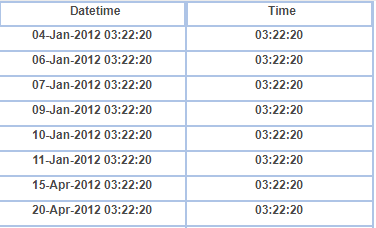
time( object ) | datetime | Returns the time from a date column | time( Date), time(04-Jan-2012 03:22:20) Return : 03:22:20 |
E.g.
- WeekdayName
Function | Description | Example |
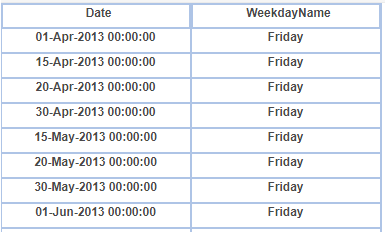
weekdayName( i, [b], [i] ) | Returns the name of a day for a given day number of a week | weekdayName ( 1, true, dayNumber(Date)) weekdayName (5, false,2) Return : Friday, weekdayName (6,true,2) Return : Saturday |
E.g.
IfCase
Function | Data Type | Description | Example |
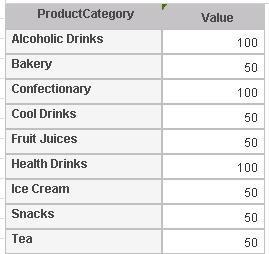
ifCase(condition, truevalue, falsevalue ) | Varchar,Integer | Returns TRUE if condition is met and returns FALSE if the condition is not met | ifCase( ProductCategory==" Alcoholic Drinks" ||ProductCategory=="Conf ectionary" ||ProductCategory=="Health Drinks", 100, 50 ) |
E.g.
- WhenThen
Function | DataType | Description | Example |
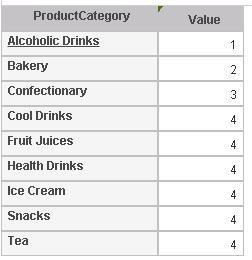
whenThen( columnname, whenvalue1, thenresult1, whenvalue2, thenresult2, ..., elseresult ) | Varchar, Integer | Tests values of a column or expression and returns values based on the results of the test | whenThen( ProductCa tegory, "Alcoholic Drinks", 1, "Bakery", 2,"Confectionary",3,4) |
E.g.
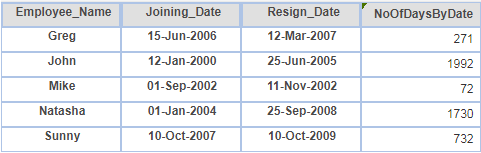
NoofDaysByDate
Function | DataType | Description | Example |
noOfDaysByDate(StartDate, EndDate) | datetime | Returns number of days between the given start date and the end date | noOfDaysByDate("2014-03-10", "2014-04-10") |
E.g.
NoofDaysByFrequency
Function | DataType | Description | Example |
noOfDaysByFrequency (PeriodFrequency, PeriodNo,isFinancialYear) | datetime | Returns the number of days in a specified frequency for a given period Possible values of PerioFrequency are: “y” for yearly, “h” for half yearly, “q” for quarterly, “m” for monthly, “w” weekly, and “d” for daily Possible values for PeriodNo are: 0 for current period, -1 for previous period, -2 for previous to previous period, and so on Possible values or isFinancialYear are: true for Financial year, false for Calendar year | noOfDaysByFrequency(“y”,0,false) : returns 365 (total days of current year, if current year is 2015) noOfDaysByFrequency(“m”,-1,false) : returns 30 (total days of previous month, if current month is May) noOfDaysByFrequency(“q”,0,true) : returns 91 (total days of current quarter of current financial year, if current quarter is quarter 1 and financial year starts from April) |
E.g.

NoofWeeksByDate
Function | DataType | Description | Example |
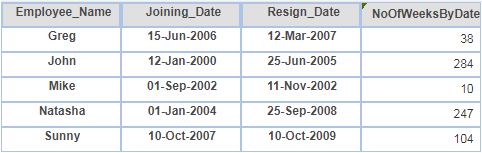
noOfWeeksByDate (StartDate, EndDate) | Datetime | Returns the number of weeks between the given start date and the end date. | noOfWeeksByDate("2014-01-01", "2015-01-01") : eturns 52 noOfWeeksByDate("2014-01-01", "2014-07-01") : returns 25 noOfWeeksByDate("2014-01-01", "2014-01-03") : returns 0 The formula used for below output is: noOfWeeksByDate("2014-01-01", "2014-01-12") |
E.g.
- NoofWeeksByFrequency
Function | DataType | Description | Example |
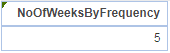
noOfWeeksByFrequency (PeriodFrequency, PeriodNo,isFinancialYear) | datetime | Returns the number of weeks within a specified frequency for a given period Possible values for PeriodFrequency are: “y” for yearly, “h” for half yearly, “q” for quarterly, “m” for monthly, “w” weekly, “d” for daily Possible values for PeriodNo are: 0 for current period, -1 for previous period, -2 for previous to previous period, and so on Possible values for isFinancialYear are: true for Financial year, false for Calendar year | noOfWeeksByFrequency(“y”,0,false) : returns 52 (total weeks of current year) noOfWeeksByFrequency(“q”,0,true) : returns 14 total weeks of current quarter of current financial year, if the current month is May Below is the example of noOfWeeksByFrequency(“m”,1,false) that returns 5 as total weeks of previous month |
E.g.
NoofMonthsByDate
Function | DataType | Description | Example |
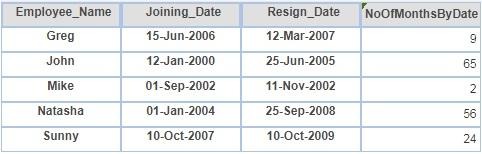
noOfMonthsByDate (StartDate, EndDate) | datetime | Returns the number of months between a given start date and end date | noOfMonthsByDate("2014-01-01", "2014-12-31") : returns 12 noOfMonthsByDate("2014-01-01", "2014-07-10") : returns 6 noOfMonthsByDate("2014-01-01", "2014-05-15") : returns 4 |
E.g.
NoofMonthsByFrequency
Function | DataType | Description | Example |
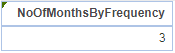
noOfMonthsByFrequency (PeriodFrequency, PeriodNo) | datetime | Returns the number of months in a specified frequency for a given period Possible values for PeriodFrequency are: “y” for yearly, “h” for half yearly, “q” for quarterly, “m” for monthly, “w” weekly, “d” for daily Possible values for PeriodNo are: 0 for current period, -1 for previous period, -2 for previous to previous period, and so on. | noOfMonthsByFrequency(“y”,0) : returns 12 as total months of current year Below is example for noOfMonthsByFrequency(“q”,-1) : which returns 3 as total months of previous quarter |
E.g.
NoofQuartersByDate
Function | DataType | Description | Example |
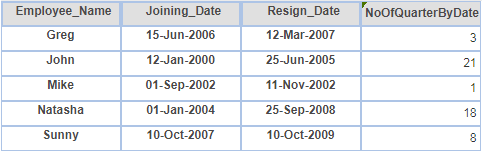
noOfQuarterByDate (StartDate, EndDate) | datetime | Returns the number of quarters between a given start date and end date | noOfQuarterByDate("2014-01-01", "2014-12-31") : returns 4 noOfQuarterByDate("2014-01-01", "2014-08-15") : returns 2 |
E.g.
NoofQuartersByFrequency
Function | DataType | Description | Example |
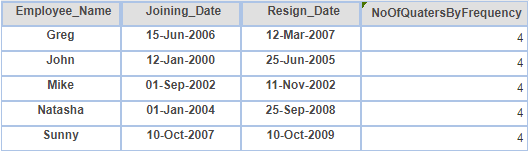
noOfQuartersByFrequency (PeriodFrequency, PeriodNo) | datetime | Returns the number of quarters in a specified frequency for a given period Possible values for PeriodFrequency are: “y” for yearly, “h” for half yearly, “q” for quarterly, “m” for monthly, “w” weekly, “d” for daily Possible values for PeriodNo are: 0 for current period, -1 for previous period, -2 for previous to previous period, and so on | noOfQuartersByFrequency(“y”,0) : returns 4 as total quarters of the current year noOfQuartersByFrequency(“y”,-1) : returns 4 as total quarters of the previous year |
E.g.
noOfHalfYearsByDate
Function | DataType | Description | Example |
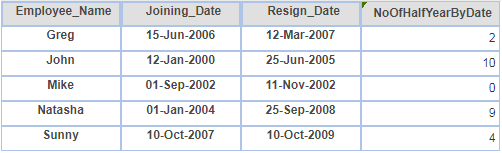
noOfHalfYearsByDate (StartDate, EndDate) | datetime | Returns the number of half years between a given start date and end date | noOfHalfYearsByDate("2014-01-01", "2014-12-31") : returns 2 noOfHalfYearsByDate("2014-01-01", "2014-05-31") : returns 0 noOfHalfYearsByDate("2014-01-01", "2014-08-31") : returns 1 |
E.g.
noOfHalfYearsByFrequency
Function | DataType | Description | Example |
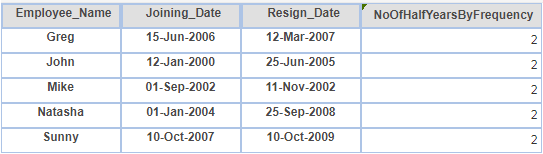
noOfHalfYearsByFrequency (PeriodFrequency, PeriodNo) | datetime | Returns the number of half years in a specified frequency for a given period Possible values for PeriodFrequency are: “y” for yearly, “h” for half yearly, “q” for quarterly, “m” for monthly, “w” weekly, “d” for daily Possible values for PeriodNo are: 0 for current period, -1 for previous period, -2 for previous to previous period, and so on | noOfHalfYearsByFrequency(“y”,0) : returns 2 as total half years of the current year noOfHalfYearsByFrequency(“q”,0) : returns 0 as the frequency is quarterly |
E.g.
For KPI only | |
Functions | Description |
KPIDateDimension() | Returns the name of the selected date dimension in a KPIFor example, if a date dimension called “SalesDate” is selected in KPI settings, it will return “SalesDate”. This function will be useful in functions like mostRecent and leastRecent where the date dimension is one of the parameters. Rather than specifying a static date dimension name in an expression, you can pass dynamic date dimension name through this function. Example: Static : mostRecent( GrossSales, “SalesDate”, “sum”, “”, “”) Dynamic : mostRecent( GrossSales, KPIDateDimension(), “sum”, “”, “”) |
KPIIsFinancialYear() | Returns true if Financial Year option is selected in KPI; otherwise, returns false |
CurrentFrequency() | Returns the currently selected frequency value in a KPI. Returns “y” for yearly, “h” for half yearly, “q” for quarterly, “m” for monthly, “b” for biweekly, “w” for weekly, and “d” for daily |
Period() | Returns the period value in a KPI. Returns 0 for the current period, -1 for the previous period, -2 for the previous to previous period, and so on. This function will be useful in functions like noOfDaysByFrequency, noOfWeeksByFrequency, etc where PeriodNo is one of the parameters. Rather than specifying the static period number in an expression, you can pass the dynamic period number through this function. Example: Static : noOfDaysByFrequency(“m”, 0, false) Dynamic : noOfDaysByFrequency(“m”, Period(), false) |
Statistic Functions
Sum
Function | DataType | Description | Example |
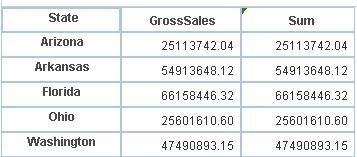
sum(condition) | Integer | Returns the sum total of the expression | sum(GrossSales) |
E.g.
Avg
Function | DataType | Description | Example |
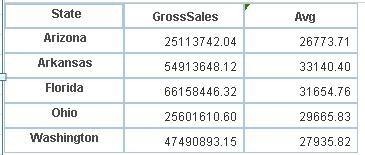
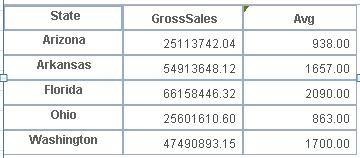
avg( condition) | Integer | Returns the average value of the expression including the Null values | avg( GrossSales) |
E.g.
EffectiveAvarege
Function | DataType | Description | Example |
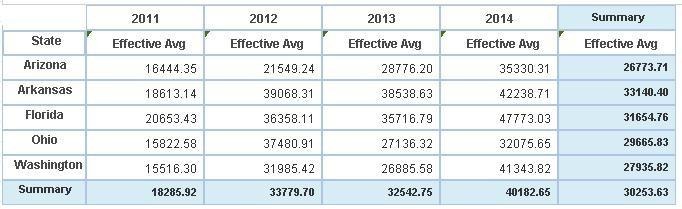
effectiveAverage(condition) | Integer | calculates average of records excluding NULL values | effectiveAverage(GrossSales) |
E.g.
Count
Function | DataType | Description | Exampleeg |
count(condition) | Integer | Calculates the total number of rows including NULL values | count(GrossSales) |
E.g.
EffectiveCount
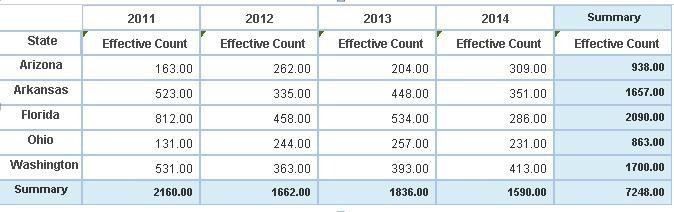
Function | DataType | Description | Example |
effectiveCount(condition) | Integer | effective count : count of Non Null values only | effectiveCount(GrossSales) |
E.g.
Maximum
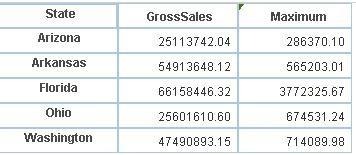
Function | DataType | Description | Example |
maximum(condition) | Integer | Returns the largest value in a set | maximum( GrossSales) |
E.g.
Minimum
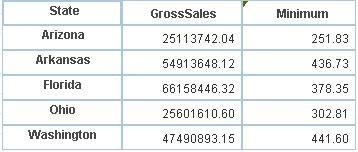
Function | DataType | Description | Example |
minimum(condition) | Integer | Returns the smallest value in a set | minimum( GrossSales) |
E.g.
ColumnPercentage
Function | DataType | Description | Example |
columnPercentage(condition) | Integer | Returns Column percentage for a complete column summary | columnPercentage(GrossSales) |
E.g.
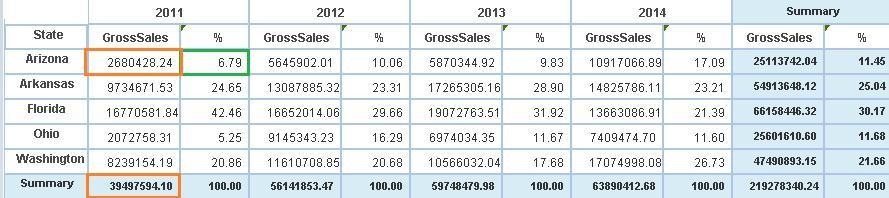
ColumnGroupPercentage
Function | Description | Example |
columnGroupPercentage(condition) | Returns column percentage for a group | columnGroupPercentage(GrossSales) |
E.g.
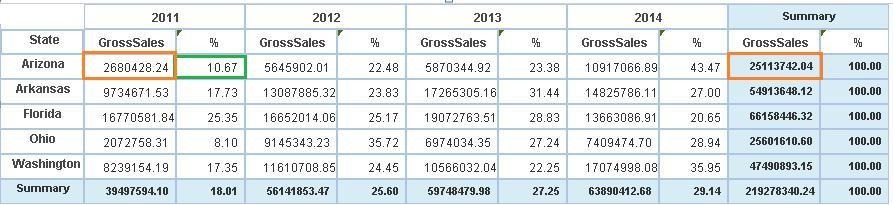
RowPercentage
Function | Description | Example |
rowPercentage(condition) | Returns the row percentage for a complete summary | rowPercentage(GrossSales) |
E.g.
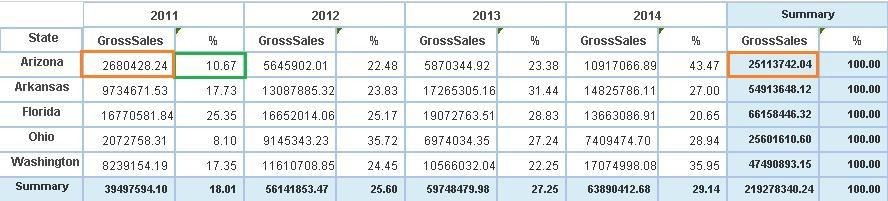
RowGroupPercentage
Function | Description | Example |
rowGroupPercentage(condition) | Returns the row percentage for a group | rowGroupPercentage(GrossSales) |
E.g.
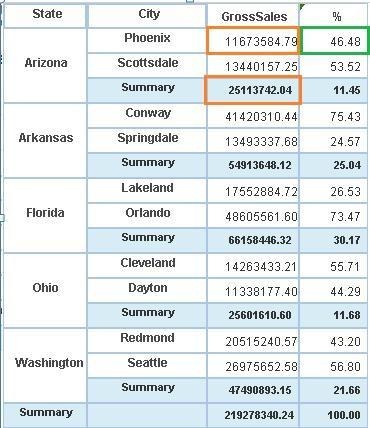
TotalPercentage
Function | Description | Example |
totalPercentage(condition) | Returns the Percentage value from the row-wise and column-wise total value | totalPercentage(GrossSales) |
E.g.
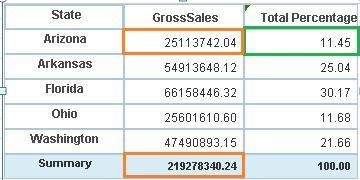
RowCumulativeSum
Function | Description | Example |
rowCumulativeSum(condition) | Returns Row wise cumulative sum of the value | rowCumulativeSum(GrossSales) |
E.g.
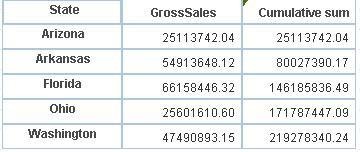
- ColumnCumulativeSum
Function | Description | Example |
columnCumulativeSum(condition) | Returns Column wise cumulative sum of the value | columnCumulativeSum(Gross Sales) |
E.g.

RealtiveRowDifference
Function | Description | Example |
relativeRowDifference(condition) | Returns the relative row difference | relativeRowDifference(GrossSales) |
E.g.

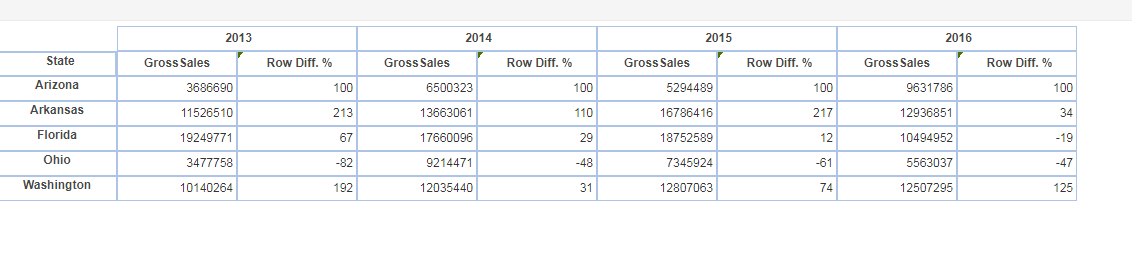
- RelativeRowDifferencePercentage
Function | Description | Example |
relativeRowDifferencePercentage ( condition) | Returns the relative row difference percentage | relativeRowDifferencePercentage(GrossSales) |
E.g.
RelativeColumnDifference
Function | Description | Example |
relativeColumnDifferencePercentage (condition) | Returns the relative Column difference | relativeColumnDifferencePercentage(GrossSales) |
E.g.
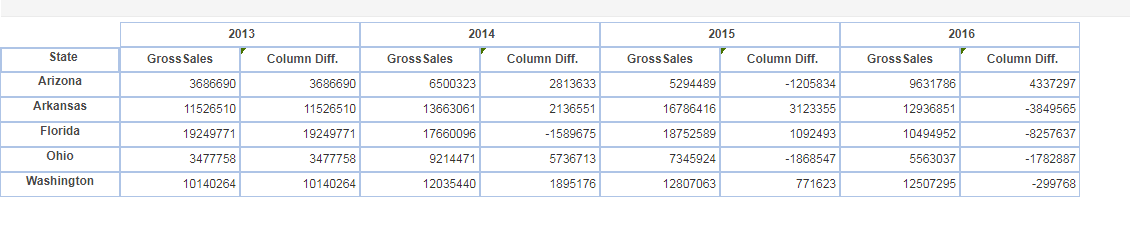
- RelativeColumnDifferencePercentage
Function | Description | Example |
relativeColumnDifferencePercentage (condition) | Returns the relative Column difference Percentage | relativeColumnDifferencePercentage(GrossSales) |
E.g.
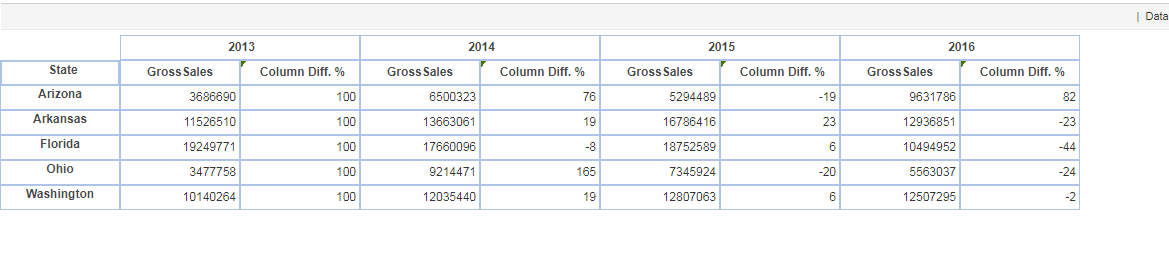
- AbsoluteRangeTimeSeries
Function | Description | Example |
absoluteRangeTimeSeries (dateDimension, startDate, endDate ) | Absolute range time series function is always used with functions such as first and last. | first( GrossSales, absoluteRangeTimeSeries( Date, "01-04-2012", "30-04-2012"), ProductCategory == "Bakery") |
E.g.
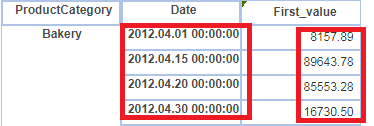
- AbsoluteTimeSeries
Function | Description | Example |
absoluteTimeSeries( dateDimension, isFY, Year, HalfYear, Quarter, Month, MonthWeek, WeekDay, MonthDay ) | Absolute time series function is always used with functions such as first and last. | first( GrossSales, absoluteTimeSeries( Date, false, 2013, "", 2, 4, "", "", ""), ProductCategory == "Bakery") |
- RelativeTimeSeries
Function | Description | Example |
relativeTimeSeries(dateDimension, isFY, Year, HalfYear, Quarter, Month, MonthWeek, MonthDay ) | Full period relative time series filter. Always use with other functions like first, last. | first(GrossSales, relativeTimeSeries( Date, false, -2, "", "",-4, "", ""), ProductCategory == "Bakery") |
E.g.

Note: Here in this example; relative time series is calculated based on current month (I.e. Aug-2017).
RelativeTimeSeriesToDate
Function | Description | eg |
relativeTimeSeriesToDate (dateDimension, isFY, YTD, HYTD, QTD, MTD, WTD ) | Relative time series to date filter is always used with other functions such as first and last | first(GrossSales,relativeTimeSeriesToDate (Date,false,-2,"","",-1,""), ProductCategory == "Bakery") |
E.g.

Note: Here in this example; relative time series to date is calculated based on current month (I.e. Aug-2017)
First
Function | Description | Example |
first ( measure, timeSeries, condition ) | Returns the first value in a set. This function is used with time series functions such as 'absoluteTimeSeries’, and ‘ absoluteRangeTimeSeries’ | first( GrossSales, absoluteRangeTimeSeries( Date, "01-04-2012", "30-04-2012"), ProductCategory == "Bakery") |
E.g.
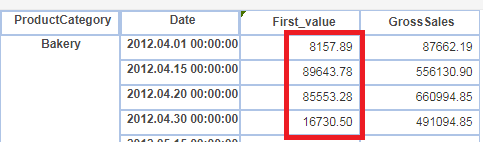
Last
Function | Description | Example |
last ( measure, timeSeries, condition ) | Returns the first value in a set. This function is used with time series functions such as ‘absoluteTimeSeries’ and ‘ absoluteRangeTimeSeries’. | last(GrossSales, absoluteRangeTimeSeries( Date, "01-04-2012","30-04-2012"), ProductCategory == "Bakery") |
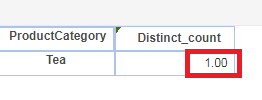
distinctCount
Function | Description | Example |
distinctCount( dimension, timeSeries, condition ) | Returns the count of unique values of the specified dimension | distinctCount( ProductCategory , absoluteRangeTimeSeries( Date, "01-04-2012", "30-04-2012"), ProductCategory == "Tea" ) |
E.g.
- LeastRecent
Function | Description | Example |
leastRecent( measure, dateDimension, dataAggregation, timeSeries, condition ) | Returns the result of different aggregation methods on the first records from the data as per the date dimension | leastRecent( GrossSales, Date, "sum", absoluteTimeSeries( Date, false, 2013, "", 2, 4, "", "", ""), ProductCategory == "Bakery") |
E.g.

- MostRecent
Function | Description | Example |
mostRecent( measure, dateDimension, dataAggregation, timeSeries, condition ) | Returns the result of different aggregation methods on the first records from the data as per the date dimension | mostRecent( GrossSales, Date, "sum", absoluteTimeSeries( Date, false, 2013, "", 2, 4, "", "", ""), ProductCategory == "Bakery") |
E.g.

String Functions
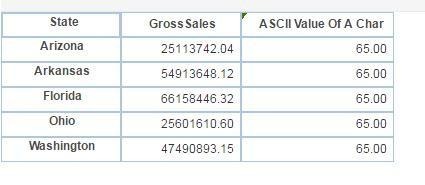
Asc
Function | Description | Example |
asc( c ) | Returns the ASCII value of a character | asc( 'A' ) |
E.g.
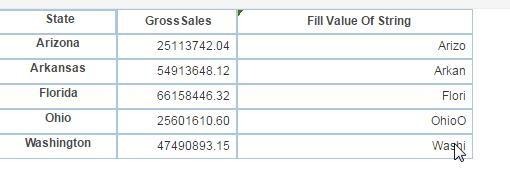
Fill
Function | Description | Example |
fill( "string", i ) | Returns a string of specified length filled with occurrences of a specified string | fill( "Arizona",5 ), fill( State, 5 ) |
E.g.
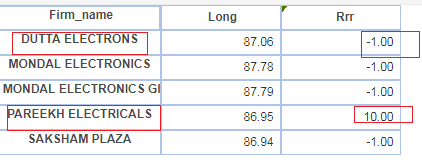
IndexofChar
Function | Description | Example |
indexOfChar ( "string", c, i ) | Returns the starting position of a character within a specified string. Here ‘i’ is the position from where search needs to start | indexOfChar( Firm_name, 'E', 10 ) |
E.g.
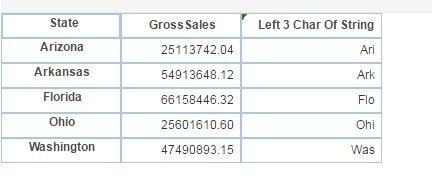
- Left
Function | Description | Example |
left( "string", i ) | Returns a specified number of characters from a string, starting with the first character | left( State, 3 ), left( "Arizona", 3 ) |
E.g.
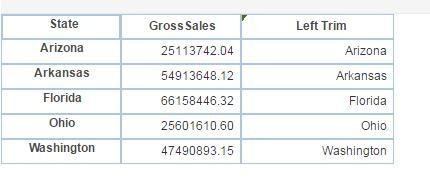
LeftTrim
Function | Description | Example |
leftTrim( "string" ) | Returns a copy of a specified string with leading blanks removed | leftTrim( State ) |
E.g.
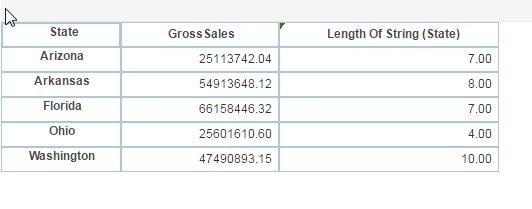
Length
Function | Description | Example |
length( "string" ) | Returns the length of a string | length(State ), Length(“Arizona”) |
E.g.
Replace
Function | Description | Example |
replace ( "string", i, i, " string" ) | Returns a copy of a specified string in which a specified number of characters, starting with a specified character, have been replaced with characters from another specified string | replace( State, 2, 4, "Elegant") |
- Reverse
Function | Description | Example |
reverse( "string" ) | Reverses the order or characters in a string | reverse( State ), reverse( ”Arizona” ) |
E.g.
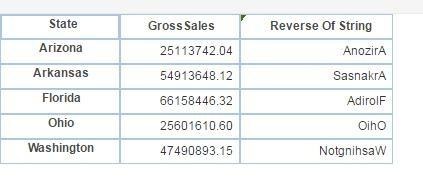
Right
Function | Description | Example |
right( "string", i ) | Returns the specified number of characters from the end of a specified string | right( State, 4 ) right( ”Arizona”, 4 ) |
E.g.
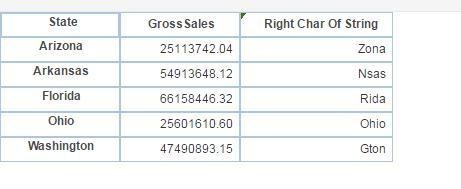
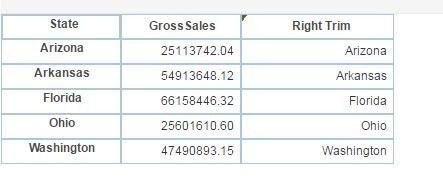
RightTrim
Function | Description | Example |
rightTrim( "string" ) | Returns a copy of a specified string with trailing blanks removed | rightTrim( State ) |
E.g.
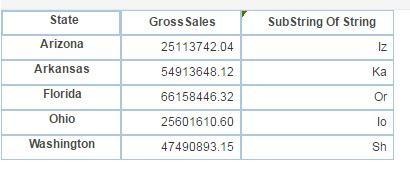
SubString
Function | Description | Example |
substring ( "string", i, i ) | Returns a string containing a character copied (starting at a specified position and ending at a specified position) from a specified string | substring(State,2,4) |
E.g.
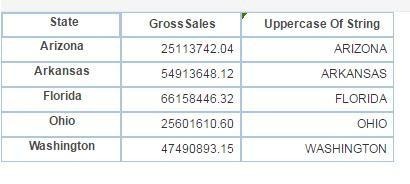
ToUpperCase
Function | Description | Example |
toUpperCase( "string" ) | Returns a copy of a specified string with all lowercase letters converted to uppercase | toUpperCase( State ) |
E.g.
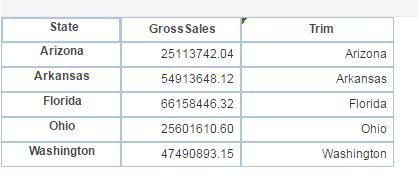
Trim
Function | Description | Example |
trim( "string" ) | Returns a string with leading and trailing blanks removed | trim( State ) |
E.g.
- Match
Function | Description | Example |
match ( "string", "string") | Returns a determination if a string contains a particular pattern of character | match( ProductCategory, 'r' ) |
E.g.
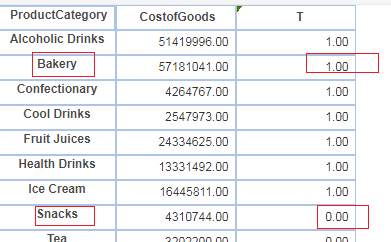
CharValue
Function | Description | Example |
charValue( i ) | Returns the content of an integer as a character | charValue(112) |
E.g.
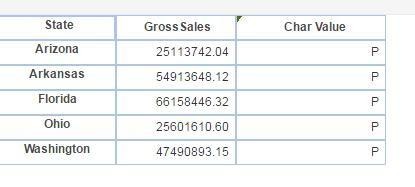
IsNumber
Function | Description | Example |
isNumber( "string" ) | Determines if the specified string contains a number | isNumber( "Abcd123" ), isNumber( "123" ) |
E.g.
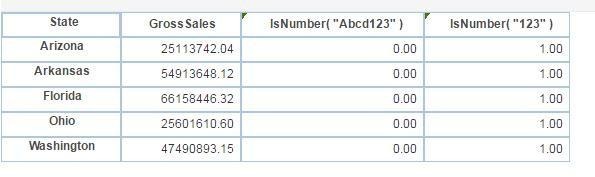
Space
Function | Description | Example |
space( i ) | Returns a string of a specified length filled with a specified number of spaces | space( 10) + "Elegant", space( 10) + State |
E.g.
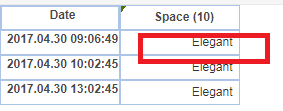
- FloatValue
Function | Description | Example |
floatValue( object ) | Returns content of a string as float | floatValue( SalesQty ) |
E.g.
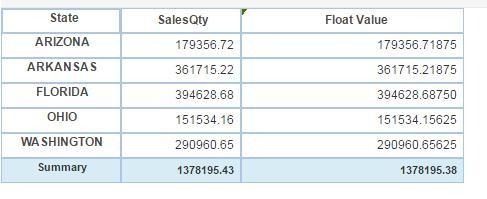
IsNull
Function | Description | Example |
isNull( object ) | Determines if the argument is NULL | isNull( GrossSales) |
E.g.

IsDate
Function | Description | Example |
isDate( "string" ) | Determines if the specified string contains a valid date | isDate( date(Date) ) |
E.g.
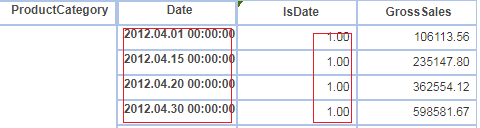
ToString
Function | Description | Example |
toString( object ) | Returns a string representation of the specified object | toString( SalesQty) |
E.g.
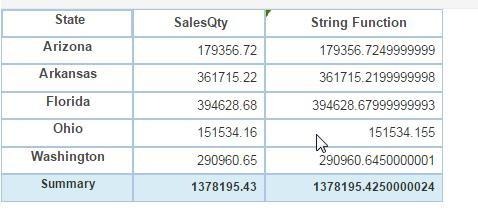
ToLowerCase
Function | Description | Example |
toLowerCase("string") | Returns a copy of a specified string with all uppercase letters converted to lowercase | toLowerCase( State ) |
E.g.
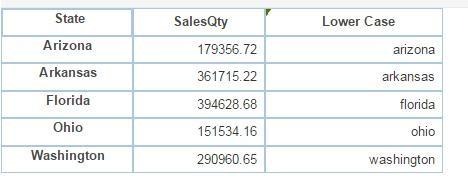
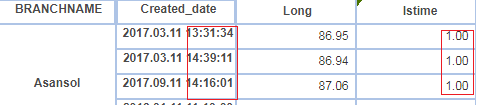
IsTime
Function | Description | Example |
isTime( "string" ) | Determines if the specified string contains a valid time | isTime( time(created_date) ) |
E.g.
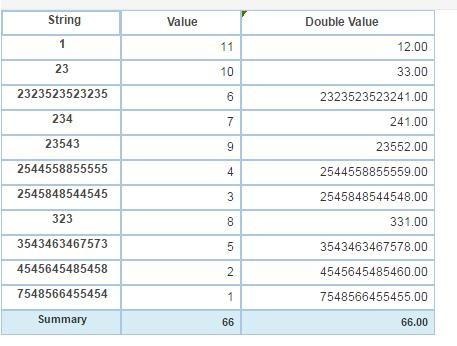
- DoubleValue
Function | Description | Example ex |
doubleValue( object ) | Returns content of a string as double | doubleValue(string) + value |
E.g.
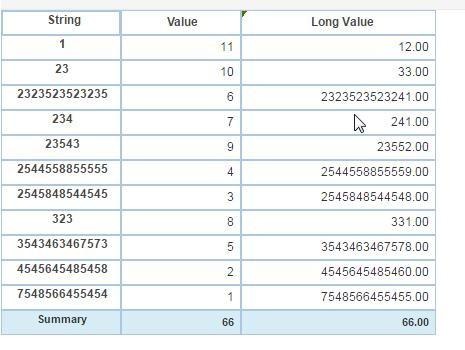
LongValue
Function | Description | Example |
longValue( object ) | Returns content of a string as long | longValue( string) + value |
E.g.
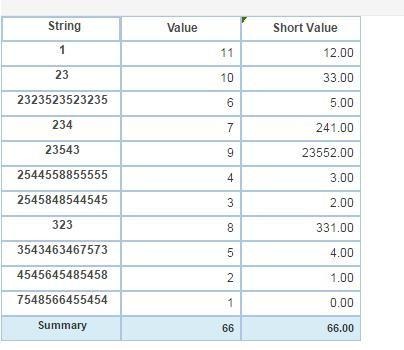
- ShortValue
Function | Description | Example |
shortValue( object ) | Returns content of a string as short | shortValue( string) + value |
E.g.
- ByteValue
Function | Description | Example |
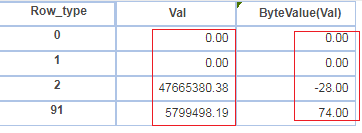
byteValue( object ) | Returns content of a string as byte | byteValue(val) |
E.g.
IntValue
Function | Description | Example |
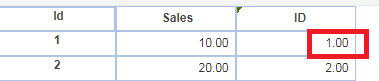
intValue( object ) | Returns content of a string as an integer | intValue( id) |
E.g.
IndexofString
Function | Description | Example |
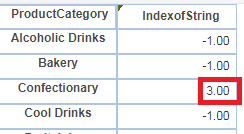
indexOfString( "string", "string", i ) | Returns the starting position of a string within a specified string | indexOfString( ProductCategory,"fe", 1 ) |
E.g.
Trigonometric Functions
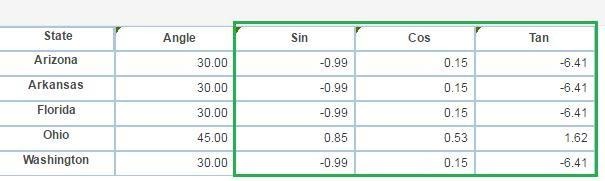
Note : Values are derived as per radian values of the angle.
Function | Description | Example |
Cos(d) | Cosine of number(number in radian) | cos(30) |
Function | Description | Example |
Sin(d) | Sine of number(number in radian) | sin(30) |
Function | Description | Example |
Tan(d) | Tangent of number(number in radian) | tan(30) |
E.g.
Was this article helpful?
That’s Great!
Thank you for your feedback
Sorry! We couldn't be helpful
Thank you for your feedback
Feedback sent
We appreciate your effort and will try to fix the article